
Cleaning up event listeners and requests is one of those tasks that often gets overlooked in web development. In frontend development, closing the page usually lets the browser clean everything up, so these tasks are easy to miss. Even when developers notice them, they often remain unaddressed. However, if you want an app to stay responsive and consistent during long sessions, or reduce unnecessary server load, you need to understand how to clean up properly.
JavaScript provides AbortSignal and AbortController, a mechanism for handling cleanup tasks such as aborting operations and removing listeners in a unified way. AbortSignal originally came out of discussions about how to abort Fetch API operations, but it has since been refined into a general-purpose mechanism that can be used in many areas of web development. Its basic functionality is Baseline Widely available, so it can be used safely in all major browsers.
This article reviews the basics of AbortSignal and then introduces practical patterns that are useful in real projects.
What you can do with AbortSignal
In short, AbortSignal is a mechanism for communicating cancellation to asynchronous operations. Consider calling an API with the fetch() function.
// Call a long-running API.
// Even if it becomes unnecessary while we wait, the request continues.
const response = await fetch("/api/long-running-task");
Calling the API itself is straightforward, but there is no way to cancel the request if it becomes unnecessary while you are waiting. In many cases, not canceling a request will not cause a major problem, but unnecessary work is still something you want to avoid. AbortSignal is what lets you tell an asynchronous operation, “This is no longer needed, so cancel it.”
The steps for using AbortSignal are as follows.
- Create an
AbortController. - Get the
signalproperty from theAbortControllerand pass it to the asynchronous operation you want to cancel. - When you want to cancel the operation, call the
abort()method on theAbortControllercreated in step 1.
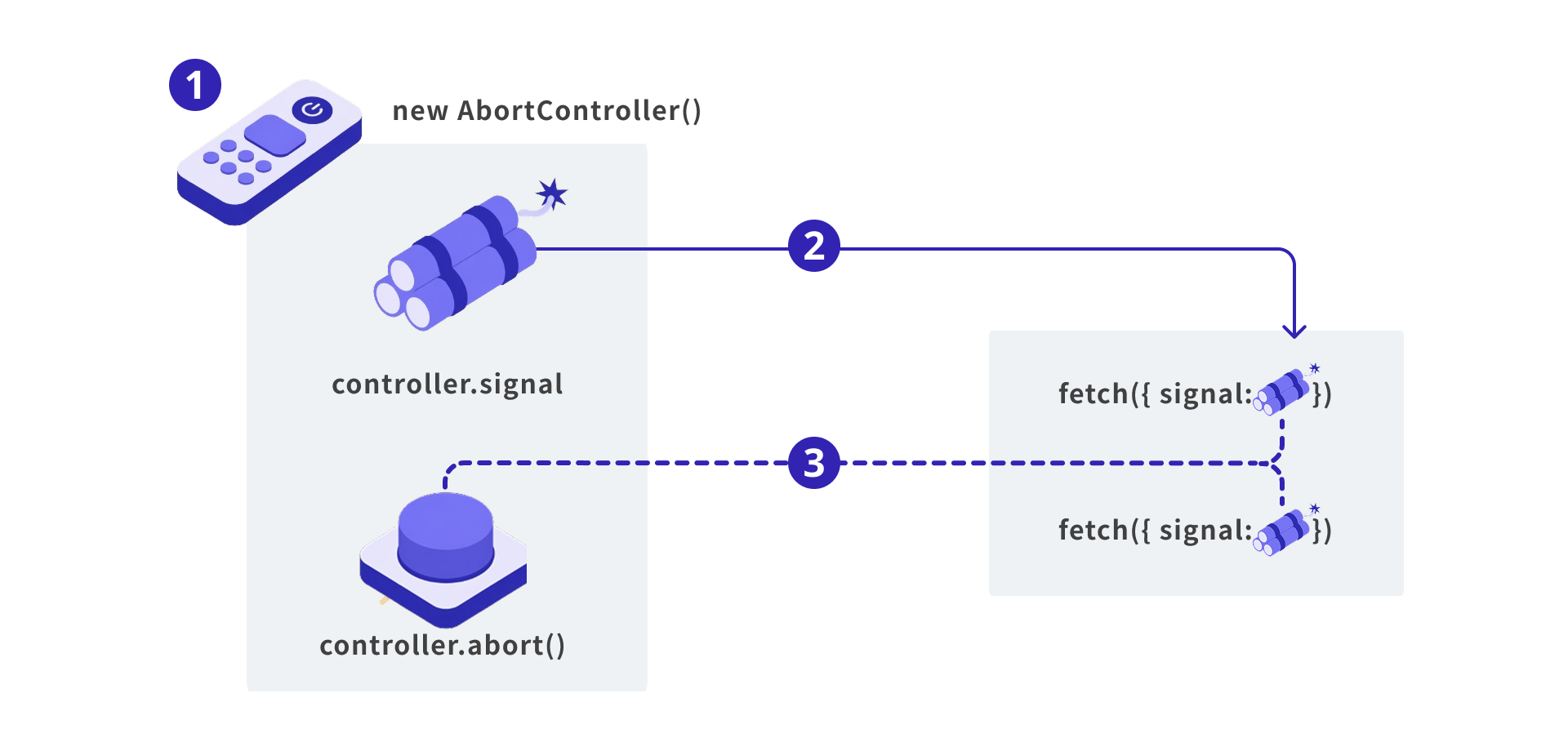
The important point is that one signal can be shared by multiple asynchronous operations. This makes it possible to write operations cleanly, such as “when this button is pressed, stop the in-progress API call, remove the temporary event listener, and stop the custom animation process all at once.”
Basic usage: canceling fetch
First, let’s look at a concrete example using the standard fetch() function.
// Create an AbortController. Create one per request.
const controller = new AbortController();
const { signal } = controller;

// Pass the signal to fetch.
fetch("/api/data", { signal })
  .then(res => res.json())
  .then(data => console.log(data))
  .catch(err => {
    if (signal.aborted) {
      console.log("Canceled");
    }
  });

// Cancel from somewhere else.
controller.abort();
The basic pattern is simply to create an AbortController instance and pass its signal object to the fetch() function. When the controller’s abort() method is called, the fetch() function is rejected with an AbortError. Note that, because it is rejected, it is treated as an error unless you handle it separately. Cancellation is often something you want to treat as a normal path, so in those cases, check the signal.aborted property and distinguish it from ordinary error handling.
Once a controller has been canceled with the abort() method, it cannot return to its original, uncanceled state. Create a new instance with new AbortController() for each request.
Where AbortSignal can be used
AbortSignal is not only for fetch. Several browser asynchronous APIs support the signal option. The one especially worth remembering is addEventListener.
You can pass signal in the options object, which is the third argument of the addEventListener() function. When the signal is aborted, the listener is automatically removed. This means you no longer need to keep the same function reference that was required when removing a listener with removeEventListener(). You can register an anonymous function and still remove it later.
With AbortSignal:
const controller = new AbortController();
const { signal } = controller;

window.addEventListener(
  "resize",
  () => console.log("resize"),
  { signal }
);

// This removes the listener.
controller.abort();
Without AbortSignal:
// Store the handler function in a variable so it can be passed to removeEventListener.
const onResize = () => console.log("resize");

window.addEventListener("resize", onResize);

// This removes the listener.
window.removeEventListener("resize", onResize);
There are other places where AbortSignal can be used as well, including stream read and write operations, navigator.locks from the Web Locks API, ReadableStream, and various Node.js APIs. You do not need to memorize all of them because you may not use them often. It is enough to remember that “cancellation of asynchronous operations means AbortSignal,” which will make it easier to choose the right approach when you need it.
Column: why doesn’t fetch itself provide a cancellation method?
Using the signal option may feel a little indirect if all you want to do is abort fetch. It would be simple if you could cancel a request like this:
// Note: this is not code that actually works.

const request = fetch("/api/data");

// Timeout after 3 seconds.
setTimeout(() => {
  request.abort();
}, 3000);

// Wait for the request.
const result = await request.promise;
Before the current design settled into place, discussions continued for quite a long time in several places, including the WHATWG Fetch issue “Aborting a fetch” and TC39’s now-withdrawn cancelable promises proposal. Some proposals were close to the shape shown above.
However, the goal was to find a general-purpose mechanism that would not significantly change the existing behavior of fetch, while also being usable by Web APIs other than fetch. As a result, adopting AbortSignal and AbortController appears to have been the more reasonable direction.
From here, let’s look at practical examples that use AbortSignal.
Use case 1: abort the previous operation before sending the next request
Consider a case where an API is called in response to user actions, such as tab UI switching or incremental search in a search box.
When the user switches tabs quickly, the next request is sent before the previous one has finished. Without any countermeasure, the following problems can occur.
- It puts unnecessary load on the server.
- If requests are queued, processing can get backed up and responses may take much longer.
- A response from an older request can arrive after the response from a later request and overwrite the screen with stale content. This is a race condition.
The following code shows an example with no countermeasure.
// Element that displays the tab content.
const tabBodyElement = document.getElementById("tab-body");

// Function for switching tabs.
const changeTab = async tabId => {
  tabBodyElement.textContent = "Loading...";
  const response = await fetch(`/contents/${tabId}`);
  tabBodyElement.textContent = await response.text();
};
If the user switches tabs quickly or if server response times fluctuate, responses can arrive out of order, causing the selected tab and the displayed content to become inconsistent. This is an example of a race condition.
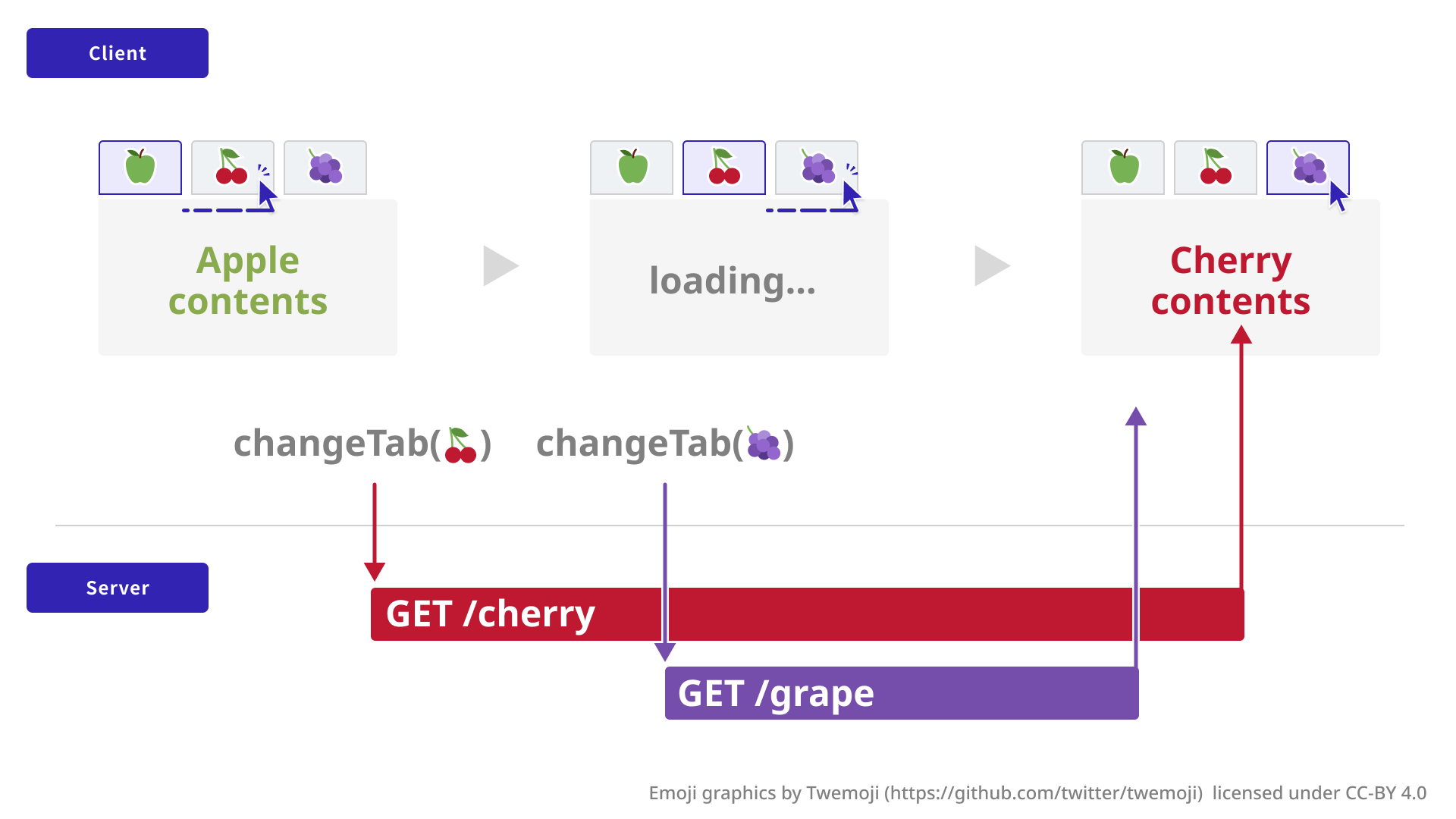
You could block the UI until the request finishes, but that would hurt the user’s experience. With AbortSignal, you can avoid the problem without blocking the UI.
// Element that displays the tab content.
const tabBodyElement = document.getElementById("tab-body");
// AbortController for managing the current request.
let currentController = null;

const changeTab = async tabId => {
  // Cancel the previous request, if there is one.
  currentController?.abort();
  currentController = new AbortController();
  const { signal } = currentController;

  try {
    tabBodyElement.textContent = "Loading...";
    const response = await fetch(`/contents/${tabId}`, {
      signal
    });
    tabBodyElement.textContent = await response.text();
  } catch (err) {
    // Rethrow errors that did not come from aborting the signal.
    // Ignore aborts, since they only stop stale requests.
    if (!signal.aborted) throw err;
  }
};
The old request is aborted as soon as the next operation arrives, so its response will not be returned.
Combining with timeouts and manual cancellation: AbortSignal.timeout() and AbortSignal.any()
Repeated user actions are not the only reason you may want to abort fetch. For example, you may want to time out if there is no response for a certain period, or abort when the user presses a cancel button. In these cases, you can combine AbortSignal.any() and AbortSignal.timeout().
AbortSignal.any() is a static method that combines multiple signal objects. When any one of the signals passed as an argument is aborted, the combined signal is also aborted. AbortSignal.timeout() is a utility that returns a signal that aborts after the specified time has elapsed.
// AbortController for managing the current request.
let currentController = null;

const changeTab = async (tabId, { signal }) => {
  // Cancel the previous request, if there is one.
  currentController?.abort();
  currentController = new AbortController();

  // Combine multiple signals.
  // If any one of them is aborted, the combined signal is also aborted.
  const combined = AbortSignal.any([
    // Signal for this request. Canceled on the next call.
    currentController.signal,
    // Signal specified by the caller.
    signal,
    // Signal that times out after 5 seconds.
    AbortSignal.timeout(5000)
  ]);

  try {
    const response = await fetch(`/contents/${tabId}`, {
      signal: combined
    });
  } catch (err) {
    if (!combined.aborted) throw err;
    // ...omitted
  }
};
The calling code looks like this:
// AbortController for cancellation.
const cancelController = new AbortController();

// Send the request with a signal.
changeTab("tab-1", { signal: cancelController.signal });

// Abort when the cancel button is pressed.
const cancelButton = document.getElementById(
  "cancel-button"
);
cancelButton.addEventListener("click", () => {
  cancelController.abort();
});
Regardless of the reason or timing of cancellation, the fetch() function only needs to receive one combined signal.
Use case 2: clean up everything when a component unmounts
In React and Vue.js components, event listeners registered on mount and in-progress fetch requests need to be cleaned up properly when the component unmounts.
With AbortSignal, you can keep one controller object per component and simply call abort on unmount to clean everything up at once.
React example:
useEffect(() => {
  const controller = new AbortController();
  const signal = controller.signal;

  // Use the same signal for both event listeners and fetch.
  window.addEventListener("resize", onResize, { signal });
  window.addEventListener("scroll", onScroll, { signal });
  document.addEventListener("keydown", onKey, { signal });

  fetch("/api/data", { signal })
    .then((res) => res.json())
    .then(setData)
    .catch((err) => {
      if (!signal.aborted) console.error(err);
    });

  // Clean up everything at once when the component unmounts.
  return () => controller.abort();
}, []);
No matter how many event listeners you have, the cleanup function only needs one call to controller.abort(). You also avoid mistakes such as forgetting to call removeEventListener() or failing to remove a listener because the event handler function reference does not match.
The same pattern works in Vue.js with <script setup> by using AbortController together with onMounted and onBeforeUnmount. The key is to tie the component lifecycle and the AbortSignal lifecycle one-to-one.
Use case 3: create your own abortable functionality
You can also build AbortSignal into your own functions. As an example, let’s create a function that makes image loading abortable. A common way to load an image in JavaScript is to create an img element with new Image() and set the URL on the src attribute. However, unlike fetch, this approach does not provide a direct way to abort the load. Let’s make it abortable with AbortSignal.
/**
 * Loads and returns an image.
 * @param {string} src - The image URL.
 * @param {AbortSignal} signal - The signal used to abort loading.
 * @returns {Promise<HTMLImageElement>} A promise for the image. Resolves with the img element when loading completes.
 */
const loadImage = (src, { signal } = {}) => {
  return new Promise((resolve, reject) => {
    // Immediately reject if the signal has already been aborted.
    signal?.throwIfAborted();

    const img = new Image();
    const listenerController = new AbortController();
    const listenerSignal = listenerController.signal;

    // When loading completes.
    const onLoad = () => {
      listenerController.abort();
      resolve(img);
    };

    // When loading fails.
    const onError = () => {
      listenerController.abort();
      reject(new Error("load error"));
    };

    // When the signal passed as an argument is aborted.
    const onAbort = () => {
      listenerController.abort();
      img.src = ""; // Stop loading.
      reject(
        signal?.reason ??
          new DOMException("Aborted", "AbortError")
      );
    };

    // Listen for abort on the signal passed as an argument.
    signal?.addEventListener("abort", onAbort, {
      signal: listenerSignal
    });

    // Start loading the image.
    img.addEventListener("load", onLoad, {
      signal: listenerSignal
    });
    img.addEventListener("error", onError, {
      signal: listenerSignal
    });
    img.src = src;
  });
};
The caller can use it in the same way as a standard API.
const controller = new AbortController();
const signal = controller.signal;
// Pass a signal, as with fetch, to make cancellation possible.
const img = await loadImage("image.jpg", { signal });

// Cancel from somewhere else.
controller.abort();
Why making your own functions abortable is useful
The main benefit of making your own functions abortable is that they can be cleaned up together with standard APIs using the same signal.
Think back to the React component example. A single controller.abort() call cleaned up both addEventListener and fetch. If your own functions also accept signal, they can be included in the same cleanup flow.
const controller = new AbortController();
const { signal } = controller;

window.addEventListener("resize", onResize, { signal });
fetch("/api/data", { signal });
loadImage("hero.jpg", { signal }); // Custom function with the same signal.

// Everything is cleaned up at once.
controller.abort();
A major value of AbortSignal is that it lets you handle event listeners, fetch, and your own asynchronous operations through the same mechanism. When designing custom libraries or shared utility functions for a project, it is often better to accept a signal option than to reinvent a custom cancellation mechanism. This reduces the burden on users and gives AI coding tools a familiar convention to work with.
Browser support
The basic functionality of AbortController and AbortSignal is Baseline Widely available and can be used in all major browsers. The signal option for the addEventListener() function and the signal option for the fetch() function are also mature enough for practical use.
Reference: Can I use…
However, the comparatively new AbortSignal.any() and AbortSignal.timeout() are Baseline 2024 Newly available. In particular, AbortSignal.any() is supported from Safari 17.4, so use it carefully in projects with strict compatibility requirements.
For more on Baseline status, see the article 『ウェブの新機能はいつまで待てば実践投入できるか』.
Conclusion
AbortSignal handles the understated topic of canceling asynchronous operations, but using it well can significantly improve code maintainability and safety.
If you design your own asynchronous operations to accept a signal option, they become cancellable in the same way as standard APIs. The next time you write asynchronous code, consider whether it should be possible to stop it from the outside, and whether it can accept a signal. That small design step can give you more options and cleaner code.