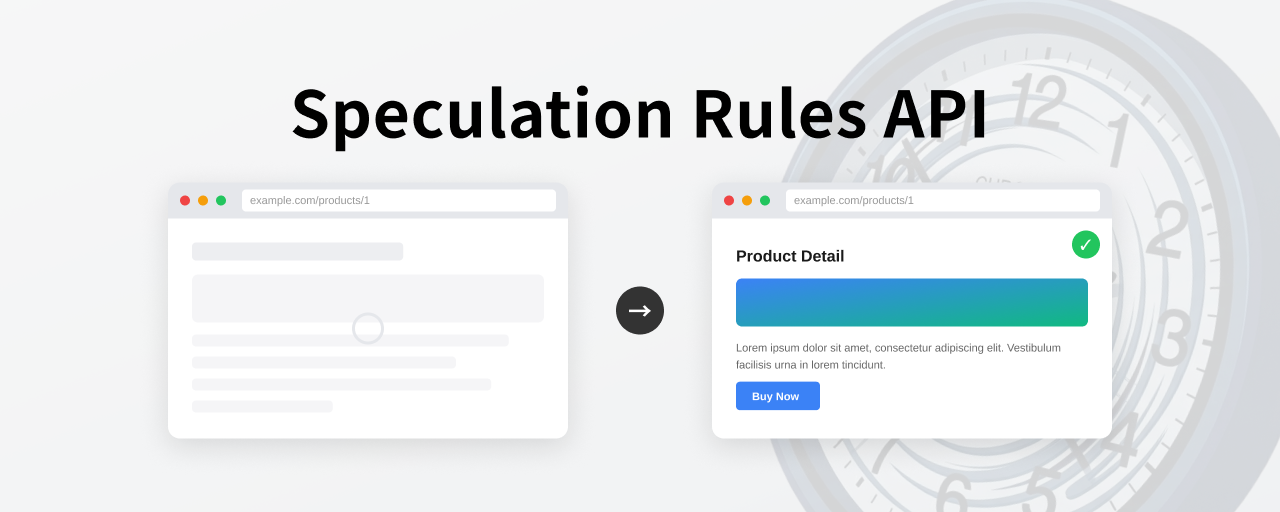
On a typical website, the browser does not start loading the next page until a link is clicked. If the browser could prepare that next page in the background before the click, the page could appear immediately and the wait would almost disappear. The Speculation Rules API enables that kind of ahead-of-time loading as a browser feature. It reduces the pause you normally feel when following links and makes navigation between pages feel smoother.
For example, when a user hovers over a link, the browser can start preparing the destination page in the background. By the time the user clicks, the page is already ready, so the transition happens instantly. In addition to hover, the trigger can also be based on pointer proximity or a pause in scrolling.
This article explains how the Speculation Rules API works, how to implement it, and what to watch out for, with demos throughout.
This video records the behavior of the demo discussed later as observed in DevTools. You can see that the browser starts preparing the page when the mouse pointer hovers over a link.
Why use Speculation Rules?
The idea of preparing the next page ahead of time is not new. Mechanisms such as <link rel="prefetch"> and <link rel="prerender"> have existed for some time. However, both had several limitations.
<link rel="prefetch">: only caches the response and does not render the page<link rel="prerender">: was defined in W3C Resource Hints, but only Chrome actually implemented prerendering. It was later deprecated and internally changed to NoState Prefetch, which did not perform full prerendering
The Speculation Rules API addresses these issues. As a standard built into WHATWG HTML, it offers the following features.
- Declarative JSON syntax: rules are written as JSON inside a
<script type="speculationrules">tag - Document rules: links can be matched automatically by URL pattern or CSS selector, so you do not need to enumerate URLs manually
- Control over
eagerness: the trigger timing can be adjusted across four levels - True prerendering: the browser fully renders the destination page in the background, including JavaScript execution
The Speculation Rules API itself has been available since Chrome and Edge 109 in January 2023. It became much more practical once document rules and eagerness were added in Chrome and Edge 121 to 122 in early 2024. On top of that, more implementation examples and performance data have accumulated, making it realistic to recommend for production use.
Where does it improve the experience?
The Speculation Rules API is especially effective on pages where the next destination is relatively predictable.
- From a product listing page to a product detail page on an ecommerce site: when the user hovers over an item, the detail page can already be prerendered
- From a news or blog index to an article page: when the user hovers over a headline or image, the article body can be prepared in the background
- From a landing page to a conversion page: buttons such as “Apply now” often lead to a single fixed destination, so a strategy using
eagerness: immediatecan work well
In setups such as SPAs (single-page applications) that already have built-in preloading through client-side routing, the framework can sometimes provide an equivalent mechanism. By contrast, MPAs (multi-page applications—websites made up of multiple HTML pages) tend to reload on each navigation. There, adding the Speculation Rules API makes it much easier to prepare the next page before the click and improve perceived speed.
As actual adoption results, the case studies published on web.dev report outcomes such as the following.
- Ray-Ban: mobile LCP improved from 4.69 seconds to 2.66 seconds, a reduction of about 43%
- Monrif: desktop LCP improved by 17.9%, while engagement increased by 8.9%
References:
- How Ray-Ban doubled conversion rate and reduced exit rate by 13% through prerendering using the Speculation Rules API
- How Monrif improved engagement by 8.9% and reduced LCP by 17.9% with Speculation Rules prerender and back/forward cache
What happens under the hood?
The following compares a normal page transition with one that uses Speculation Rules.
Standard page transition
- The user clicks a link
- The browser sends an HTTP request
- The HTML response is received
- Subresources such as CSS, images, and JavaScript are fetched
- The page is displayed after rendering finishes
Page transition with Speculation Rules (eagerness: moderate)
- The user hovers over a link on desktop for 200 ms, or presses down with a pointer
- The browser starts prerendering the destination page in the background
- HTML is fetched, subresources are loaded, and rendering completes offscreen
- The user clicks the link
- The prerendered page is shown immediately
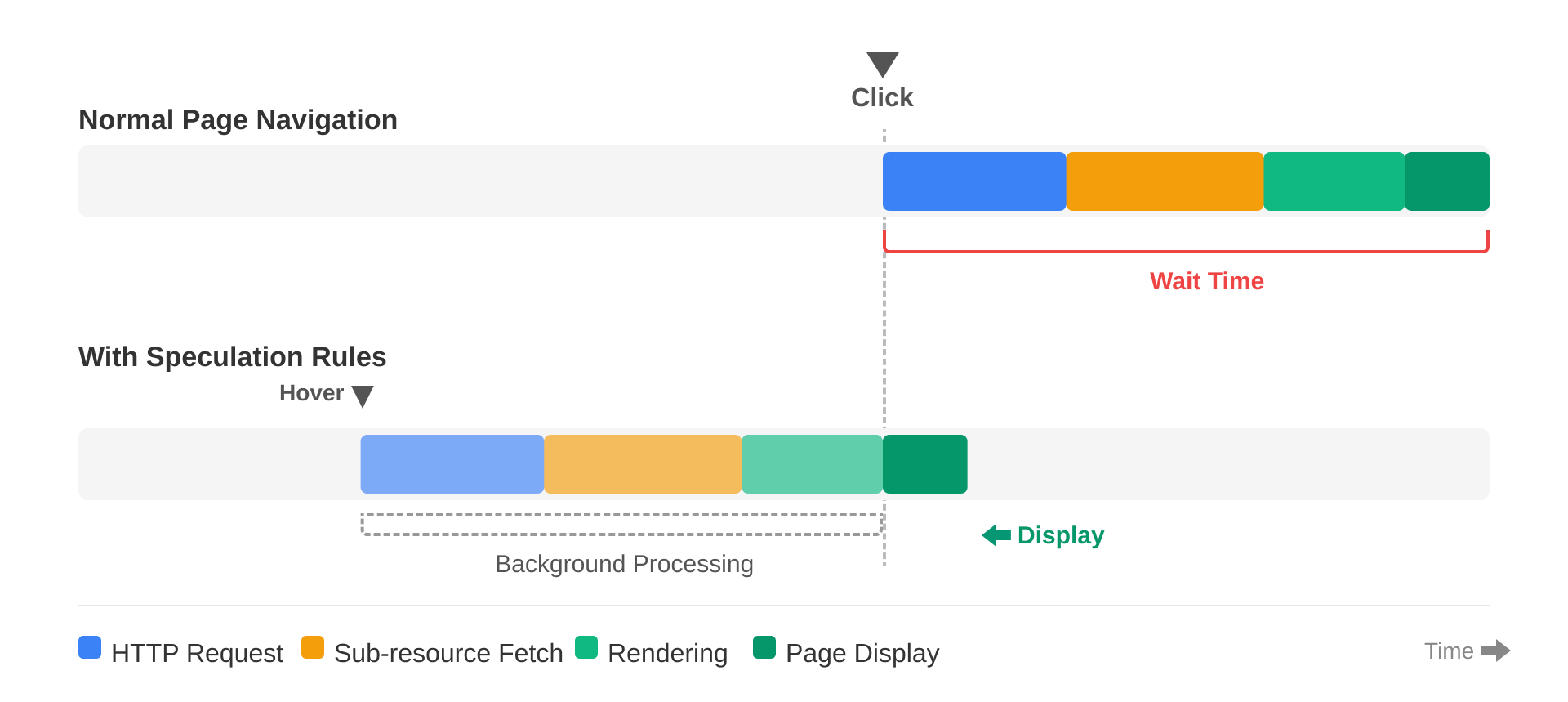
The key point is that rendering is already complete when the click happens. In a normal navigation flow, the browser still has to wait for network requests and rendering after the click. With prerendering, that waiting time is gone, so the transition feels instantaneous.
How to inspect it in DevTools
With Speculation Rules enabled, the visible delay after a click nearly disappears. From here, let’s inspect that behavior in Chrome DevTools.
Application panel
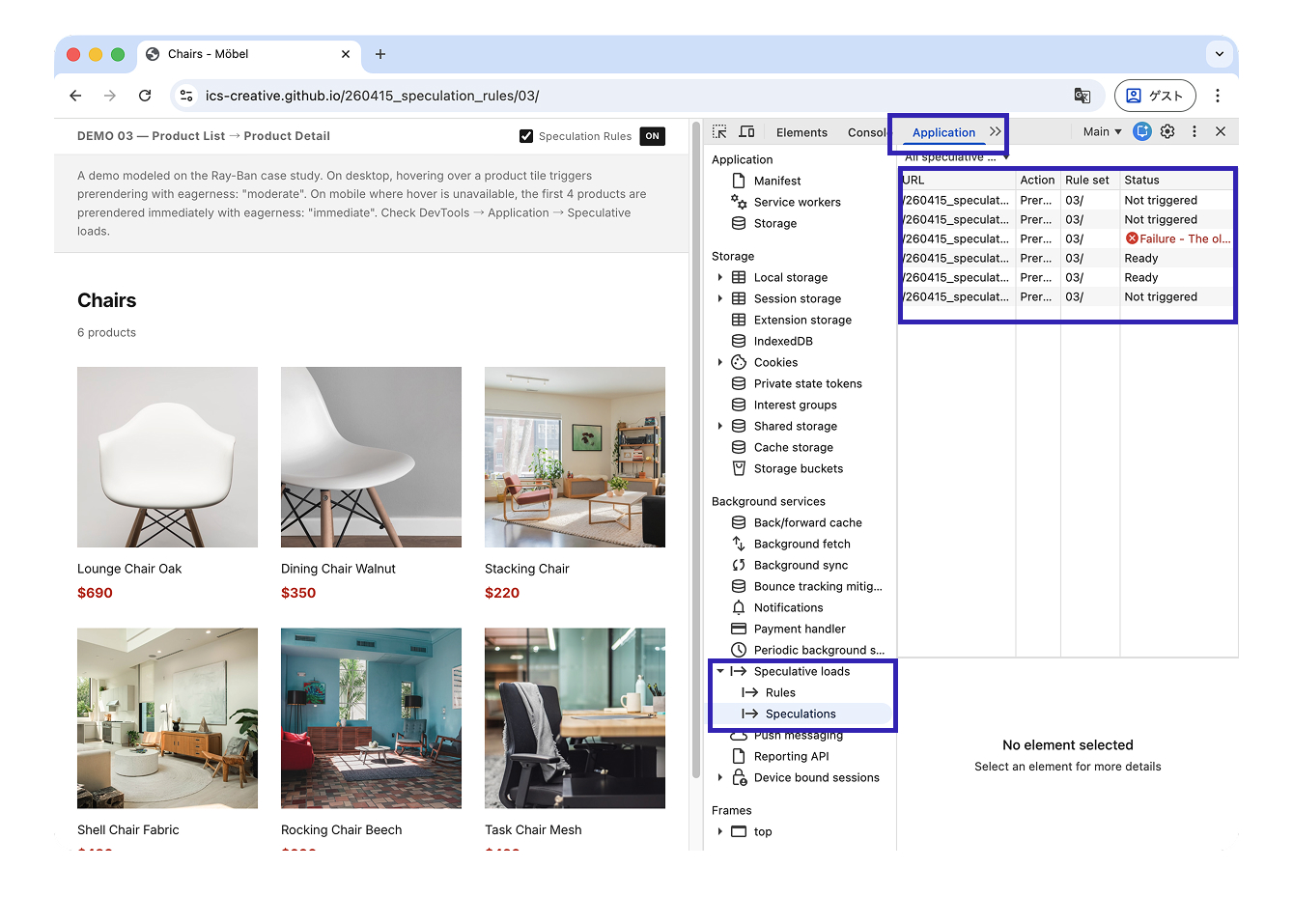
Open Chrome DevTools, then go to the Application panel and select Background services → Speculative loads from the left sidebar. There, you can inspect the following:
- Rules: details of the active rule sets
- Speculations: a list of Speculation Rules detected on the current page, along with the state of each speculative load, such as Ready or Running
Important: reload the page after opening DevTools. Speculative loads that happened before DevTools was open are not recorded.
In DevTools, this mechanism is labeled Speculative loads.
Network panel
prefetch requests appear in the current page’s Network panel. Because the request header includes Sec-Purpose: prefetch, they can be distinguished from ordinary requests.
prerender runs in a separate renderer, so those requests do not appear in the current page’s Network panel. If you switch to the prerendered page from the dropdown at the top of DevTools, you can inspect that page’s network requests there. Those requests use the header Sec-Purpose: prefetch;prerender.
Basic implementation
Implementing the Speculation Rules API is very simple. Add the following <script> tag inside either the <head> or <body> of your HTML.
<script type="speculationrules">
{
  "prerender": [{
    "where": { "href_matches": "/*" },
    "eagerness": "moderate"
  }]
}
</script>
With this alone, hovering over a link on the page for 200 milliseconds causes the browser to start prerendering the destination page in the background.
Here is what each part means.
"prerender": the action type. There are two options:"prefetch"for fetching only the HTML, and"prerender"for full rendering"where": a document rule used to match links on the page by URL pattern or CSS selector"href_matches": a URL pattern."/*"matches every path on the same origin"eagerness": how aggressively speculative loading begins."moderate"activates after a 200 ms hover
If you want to target only specific URLs, you can use a list rule with urls instead of where.
<script type="speculationrules">
{
  "prerender": [{
    "urls": ["/products/", "/about/"]
  }]
}
</script>
After implementation, verify the behavior in DevTools under Application → Speculative loads.
Demo: using it with the View Transitions API
This demo shows navigation from a listing page to a detail page. By combining the View Transitions API with Speculation Rules, even an MPA can achieve both smooth page transition animation and near-instant display.
For more on the View Transitions API, see the article Introduction to the View Transition API for seamless page transitions.
Choosing eagerness
The eagerness property controls when speculative loading begins. Four values are available.
| Setting | Trigger timing | Typical use |
|---|---|---|
immediate |
Immediately after the rule is detected | Pages where the destination is almost certain, such as an application button on a landing page |
eager |
Triggered by a lighter signal of user intent, such as a very brief hover or other early heuristics | Better suited to prefetch |
moderate |
A 200 ms hover or pointerdown |
Recommended for prerender |
conservative |
pointerdown or touchdown |
When side effects are a concern |
The next demo follows the Ray-Ban case study: a transition from a product listing page to a product detail page on an ecommerce site. On desktop, hovering over a product tile triggers moderate prerendering. On mobile, because hover is not available, the first four products are prerendered immediately with immediate. The product detail page contains many images, so the difference between Speculation Rules ON and OFF is easy to notice.
A practical production pattern is to combine prefetch and prerender.
<script type="speculationrules">
{
  "prefetch": [{
    "where": { "href_matches": "/*" },
    "eagerness": "eager"
  }],
  "prerender": [{
    "where": { "href_matches": "/*" },
    "eagerness": "moderate"
  }]
}
</script>
This approach uses prefetch broadly with eager, while limiting prerender to hovered links with moderate. It helps balance bandwidth and memory usage while still making hovered destinations appear instantly.
Limits on concurrent speculative loads in Chromium browsers
Chrome and Edge impose limits on concurrent speculative loads to protect resources.
eagerness |
Prefetch | Prerender |
|---|---|---|
immediate |
50 | 10 |
eager / moderate / conservative |
2 (FIFO) | 2 (FIFO) |
For eager, moderate, and conservative, Chrome and Edge use a FIFO queue. If the limit of two is reached and the user hovers over another link, the oldest speculative load is automatically canceled. If the user hovers over that earlier link again, it is triggered again.
The limit for immediate is managed dynamically. If the <script type="speculationrules"> element is removed from the DOM, its slot is released and a new speculative load can take its place. The ON/OFF toggle in the demo described earlier uses this behavior.
Chrome and Edge also disable speculative loading under the following conditions.
- The
Save-Dataheader is active - Energy Saver is enabled
- the user has disabled page preloading in browser settings
- the device is low on memory
That is why the combination of prefetch with eager and prerender with moderate is a practical pattern in real-world use.
Pitfalls and how to handle them
Here are three things to watch out for when introducing the Speculation Rules API.
1. Exclude URLs with side effects
URLs that cause side effects on a GET request, such as logout endpoints or add-to-cart URLs, should not be speculative targets. Use not conditions inside where.
<script type="speculationrules">
{
  "prerender": [{
    "where": {
      "and": [
        { "href_matches": "/*" },
        { "not": { "href_matches": "/logout" } },
        { "not": { "href_matches": "/cart/add/*" } },
        { "not": { "selector_matches": "[data-no-prerender]" } }
      ]
    },
    "eagerness": "moderate"
  }]
}
</script>
With selector_matches, you can also exclude individual links through HTML attributes.
2. Prevent duplicate analytics measurement
Because JavaScript runs during prerendering, analytics pageviews can be counted twice unless initialization is guarded properly. Use the document.prerendering property and the prerenderingchange event.
if (document.prerendering) {
  document.addEventListener("prerenderingchange", () => {
    // Initialize analytics only when the user actually sees the page
    initAnalytics();
  }, { once: true });
} else {
  initAnalytics();
}
Google Analytics and Google Publisher Tag already take prerendering into account. If you use other third-party tools, you may need to handle them individually.
3. Disabling by browser extensions
Ad blockers such as uBlock Origin may disable prefetching or prerendering. This is intentional behavior designed to protect user privacy.
Treat the Speculation Rules API as progressive enhancement. Even when it is disabled, ordinary page navigation still works.
Browser support
The base feature of the Speculation Rules API, <script type="speculationrules">, is available in Chrome and Edge 109 and later.
However, the implementation style used throughout this article assumes document rules (where) and eagerness, so Chrome and Edge 121 or later—and, from a production standpoint, 122 or later—are the safer target. Firefox does not currently support the API, and Safari support remains disabled by default.
Reference: Can I use…
Conclusion
As shown above, the Speculation Rules API can shorten the wait during page transitions in MPAs. Nuxt and Next.js can achieve something similar through client-side routing, but for MPAs such as static sites and WordPress sites, the value of introducing the Speculation Rules API is especially high.
For now, practical support is still limited to Chromium-based browsers. Unsupported browsers simply ignore the feature, so it can be added safely to existing sites.
For more on improving website performance, see the article Techniques for faster image loading in HTML.